
Degree requirements look straightforward in a catalog, but students rarely follow a perfectly predictable path. They transfer, change majors, receive course substitutions, and complete coursework that doesn’t always fit neatly into a degree plan.
Your degree audit software should handle these exceptions without creating extra work for advisors. That’s why FlightPath makes it easy to accommodate unusual academic requirements, from substitutions and split credits to changing majors.
Course Substitutions Without the Headache
A student completes a course that doesn’t exactly match a degree requirement, but the department approves it as a substitute. How easily can your degree audit software accommodate that decision?
With FlightPath, authorized staff can substitute completed coursework for any course requirement, including transfer courses.
And the benefits go beyond simply replacing one course with another:
- Apply exactly the number of credits approved, including partial credits.
- Automatically update the student’s degree plan and progress charts.
- Document substitutions with optional approval remarks for future advisors.
- Split coursework across multiple requirements when appropriate.
No separate spreadsheets, manual degree plan corrections, or searching through old emails to figure out why a requirement was satisfied.
Split Credits and Partial Substitutions
Sometimes a course doesn’t fit neatly into a single requirement.
Imagine a student who has completed a four-credit course. The department approves applying 2.5 credits toward one requirement and the remaining 1.5 credits toward another.
FlightPath handles fractional credit hours, too. Staff specify exactly how many credits to apply to each requirement, without changing the original course record.
The same flexibility applies to partial substitutions. If an approved course satisfies only part of a requirement, FlightPath reflects the credits applied while keeping the remaining requirement visible.

FlightPath applies 1.75 credit hours from a substituted course while showing the 1.25 hours still needed to complete the requirement.
FlightPath adapts to your institution’s academic policies, rather than forcing your advisors to work around software limitations.
What Happens When Students Change Majors?
A course substitution approved for one degree program may not apply to another. Likewise, a course that satisfies an elective requirement in one major might fulfill a core requirement elsewhere.
FlightPath’s What-If degree audits help students and advisors explore alternative academic paths using the student’s existing coursework.
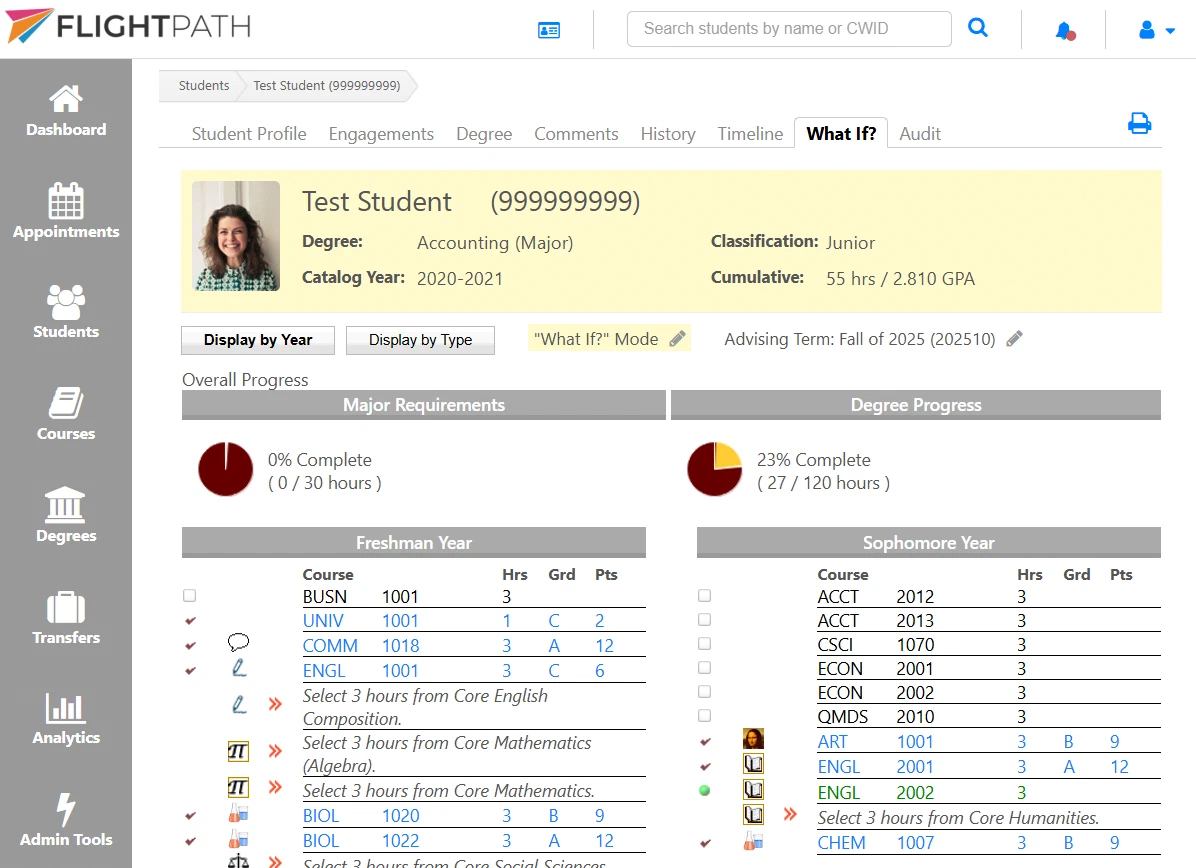
Students can explore different degrees, majors, minors, and concentrations without changing their current academic program. FlightPath recalculates their progress using the requirements of the selected program, helping them understand which courses still count and what remains to be completed.
Authorized staff can also review previously recorded substitutions through the Administrator’s Toolbox and remove those that no longer apply.
The result is a degree planning system that accommodates changes in academic direction without losing sight of the student’s completed coursework.
Flexibility Should Be Built Into Your Advising Software
Every college and university has its own academic policies, curriculum requirements, and approval processes. Your degree audit software should support those policies, not force your institution to work around the software.
FlightPath combines flexible degree requirements, course substitutions, transfer credit handling, and What-If planning in one academic advising platform.
And because degree audits are only part of the equation, FlightPath also brings academic planning and advising together, helping institutions turn degree requirements into practical plans for graduation.
When unusual academic situations arise, advisors should be able to focus on helping students make progress toward graduation, rather than figuring out how to make their software cooperate.