
Academic advising brings together a lot of information: degree requirements, completed courses, future plans, advising history, student concerns, and institutional policies. Good advising software brings that information together so advisors and students can see the academic path clearly.
But choosing a platform is about more than counting features. The right software needs to fit your curriculum, advising model, student experience, technical environment, and budget. Here are the areas worth examining when you compare your options.
Look for Strong Degree Planning and Degree Audit
An advising system should do more than tell students whether they have checked off a requirement. It should help them understand where they are, what remains, and what they should consider taking next.
That gets harder as curricula become more complex. Look for software that handles prerequisites, minimum grades, transfer equivalencies, substitutions, exceptions, concentrations, electives, certificates, and multiple programs without making the student’s academic path difficult to understand.
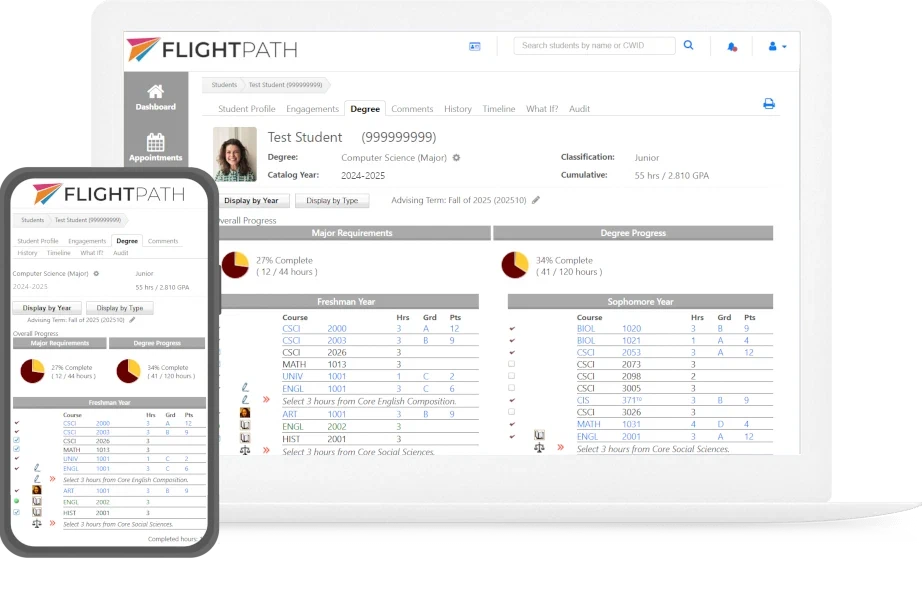
FlightPath combines degree audit and academic planning with the broader advising process. Advisors and students can see completed requirements, remaining requirements, and future course plans in the context of the student’s overall academic path.
Evaluate the Advisor and Student Experience
Powerful software still has to be practical for everyday use. Advisors need quick access to the information they use most, while students should be able to understand their progress without relying on an advisor for every question.
Look for:
- Clear degree progress
- Straightforward advisor workflows
- Student access to planning and academic information
- Advising history, notes, recommendations, and interactions
- Mobile-friendly access
Ease of use matters because an advising system only helps when advisors and students actually use it.
Look for Proactive Advising, Communication, and Reporting
Advising software needs to do more than document what happened after a student has a problem. It should help institutions identify students who need attention and give advisors useful information to decide what to do next.
Early alerts, at-risk indicators, and tools such as FlightPath’s Academic Priority help advisors focus on students who need additional support.
Look for reporting on degree progress, advising activity, student usage, course registration, and students who may need additional attention. Good reports answer the questions your institution actually needs to answer.
Look for Flexibility and Customization
Every institution has its own terminology, curriculum, policies, and advising workflows. The software should adapt to those differences rather than forcing your institution into a fixed model.
When comparing platforms, look at what you can configure yourself and what requires vendor assistance:
- Degree requirements and curriculum rules
- Institutional terminology and branding
- Advising workflows and permissions
- Reports and dashboards
- Custom programming and integrations
Flexibility matters especially when your institution has complex degree requirements or advising processes that do not fit neatly into a standard template. Before choosing a platform, make sure it can accommodate how your institution actually works. Learn more about how FlightPath approaches customization.
Compare the Complete Picture
The right academic advising software is not simply the platform with the longest feature list. Compare degree audit, planning, advisor workflows, the student experience, proactive advising, communication, integrations, reporting, flexibility, reporting, support, and total cost.
Compare FlightPath with established advising and student success platforms in our How FlightPath Compares guide.